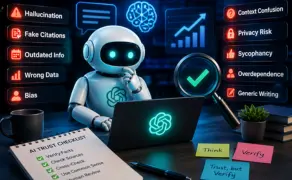
I still remember the first time ChatGPT gave me a fake quote. It sounded real. It even had a name and a date attached.
I almost used it in a client blog. Almost.
That one moment changed how I use AI tools forever.
ChatGPT can write code, summarize a whole book, brainstorm ideas, and explain hard topics in seconds. It feels like magic sometimes.
But it is not perfect. It can misunderstand you. It can make up facts. It can sound confident even when it is wrong.
Knowing these mistakes will save you time, money, and sometimes, embarrassment. Let’s go through them one by one, the way I wish someone had shown me years ago.
Quick Summary: ChatGPT Mistakes at a Glance
| Mistake | Risk | Solution |
| Hallucination | Wrong facts stated confidently | Verify with a trusted source |
| Fake citations | Made-up studies or links | Check the source yourself |
| Context confusion | Generic or off-topic answers | Give more background detail |
| Outdated info | Wrong or old decisions | Ask for the latest data |
| Wrong calculations | Bad numbers, bad logic | Double-check with a calculator |
| Generic writing | Sounds robotic, repetitive | Add personal tone and edits |
| Sycophancy | Agrees even when you’re wrong | Ask it to challenge you |
| Bias in answers | Skewed or one-sided views | Ask for multiple viewpoints |
| Privacy risk | Sharing private data by mistake | Never paste sensitive info |
| Overdependence | Losing your own judgment | Use AI as a helper, not a boss |
Why Does ChatGPT Make Mistakes?
Here’s the part most people skip. And it’s the part that actually matters.
ChatGPT is not a search engine. It doesn’t “look things up” the way Google does.
It’s a large language model. That means it predicts the next word in a sentence, based on patterns it learned from huge amounts of text.
Think of it like this: language becomes tokens, tokens turn into probabilities, and probabilities turn into a response.
There’s no little librarian inside checking facts. There’s just math, guessing what sounds right.
Large language models generate responses by predicting the most likely sequence of words rather than retrieving verified facts. That’s one big reason hallucinations happen.
It’s also not a human brain. It has no memory of you, no gut feeling, no lived experience.
So when it sounds sure of itself, that confidence is not proof. It’s just a pattern.
Here’s a simple way to picture it. Every sentence you type gets broken into small pieces called tokens, sometimes a full word, sometimes just part of one.
The model looks at those tokens and asks one question, over and over: what usually comes next? Not what’s true. What’s likely.
There’s also something called a context window showing how much of the conversation it can hold in “memory” at once. Go past that limit, and older details start slipping away, which is often when answers drift off track. This is part of why good prompt engineering, simply giving clear context, helps it predict better.
This is exactly why hallucinations happen. The model fills gaps with the most probable-sounding words, even when probable and true aren’t the same thing.
And it’s not rare. Stanford HAI’s 2026 AI Index found hallucination rates across 26 leading LLMs ranging from 22% to 94%, depending on the task.
Your Prompt
↓
Tokenization
↓
Pattern Prediction
↓
Language Generation
↓
Final Response
↓
Human Verification
ChatGPT vs Search Engine: What’s the Real Difference?
Understanding how ChatGPT differs from search engines is an important part of this complete chatGPT guide, helping you choose the right tool for every task.
| Feature | ChatGPT | Search Engine |
| Source of answer | Predicts patterns from training data | Pulls live pages from the internet |
| Fact freshness | Limited by training/knowledge cutoff | Real-time, updated constantly |
| Citations | Can invent sources | Shows actual links |
| Best for | Explaining, drafting, brainstorming | Finding current facts, news |
10 Common ChatGPT Mistakes And How to Fix Them
Understanding these common ChatGPT mistakes will help you get more accurate answers, avoid costly errors, and use AI more effectively. Here’s how to spot each mistake and fix it.
1. ChatGPT Can Confidently Generate Incorrect Information
This is called hallucination. It’s the most talked-about ChatGPT mistake, and for good reason.
ChatGPT sometimes states something false. But it says it like a fact. No hesitation, no “I’m not sure.”
Why it happens: It’s filling gaps with the most likely-sounding answer, not the most accurate one.
Real example: Ask it for a statistic on a niche topic, and it may give you a number that sounds exactly 73.4%, for instance that doesn’t exist anywhere.
My Experience: While researching AI tools for a client project, I noticed ChatGPT cited a study that simply didn’t exist. Since then, I always verify important numbers before publishing anything.
Impact: Publishing a false stat can hurt your credibility fast. Readers remember when you get it wrong.
How to avoid:
- Verify any number or fact through a real source
- Ask “is this a real, verifiable fact?” directly
- Cross-check with Google before publishing
- Treat surprising claims with extra suspicion
Key takeaway: If it sounds too specific and you can’t find it anywhere else, don’t trust it blindly.
2. ChatGPT Can Create Fake Citations and Sources
This one is sneaky. It’s related to hallucination, but it deserves its own spot.
ChatGPT can invent a study name, an author, even a working-looking link. All fake.
Why it happens: It knows what citations “look like.” So it builds one that fits the pattern, even without a real source behind it.
Real example: Ask for “a 2023 study on productivity,” and you might get a title, journal name, and page number. None of it real.
Lesson Learned: Earlier, I used to trust ChatGPT’s first response while writing outlines. Over time, I learned to ask, “what important points are missing?” That single follow-up question changed my whole workflow.
Impact: Using a fake citation in an academic or professional paper can damage your reputation badly.
How to avoid:
- Search the exact citation title yourself
- Ask ChatGPT for real, well-known sources only
- Never copy-paste a citation without checking it
- Use Google Scholar for academic claims
Expert Tip: Ask ChatGPT, “What evidence supports this answer?” It often reveals how thin the backing really is.
3. ChatGPT Sometimes Misunderstands Your Context
Ever get an answer that felt… off? Like it answered a different question than the one you asked?
That’s a context mistake. It happens more than people admit.
Why it happens: ChatGPT only knows what you tell it in that conversation. It can’t read your mind, your industry, or your goals.
Real example: Ask “how do I grow fast” without context, and it might assume you mean a business, when you meant a plant.
Impact: Vague prompts lead to generic answers. Generic answers waste your time.
How to avoid:
- Give background details in your prompt
- Mention your goal clearly
- Add examples of what you want
- Break big requests into smaller steps
4. ChatGPT Can Share Outdated Information (Knowledge Cutoff Explained)
ChatGPT has a knowledge cutoff. It doesn’t automatically know today’s news unless it’s searching live.
Why it happens: Its core training stopped at a certain point in time. Anything after that is a blind spot.
Real example: Ask about “the latest phone model” and it might describe something that’s already old news.
Impact: Outdated info can lead to wrong business decisions or embarrassing mistakes in content.
How to avoid:
- Ask if the tool has real-time search enabled
- Cross-check dates and recent events
- Use it for ideas, not breaking news
- Always verify time-sensitive facts
5. ChatGPT Can Get Calculations and Reasoning Wrong
Numbers trip it up more than people expect. Even simple math, sometimes.
Why it happens: It’s built for language, not arithmetic. Reasoning models have improved this, but errors still slip through, especially in multi-step problems.
Real example: Ask a multi-step word problem, and it may skip a step or round a number incorrectly.
Impact: Wrong numbers in a report or budget can cause real financial trouble.
How to avoid:
- Double-check with a calculator or spreadsheet
- Ask it to “show its steps” so you can spot errors
- Use it for logic ideas, not final math
- Verify anything involving money
6. ChatGPT Can Sound Generic or Repetitive
Sometimes the writing just feels… flat. Like it’s said this a hundred times before. Because, well, it kind of has.
Why it happens: It leans on common phrases and safe structures. That’s what “average” language sounds like.
Real example: Ask for a product description, and you’ll often see the same words pop up “elevate,” “seamless,” “unlock.”
Opinion: In my opinion, ChatGPT works best as a thinking partner, not a replacement for your own voice. It speeds up the first draft. The soul still comes from you.
What Changed My Workflow: For a while, I used ChatGPT’s first draft as my final draft light edits, then published. Then a stat didn’t check out, and it burned me. Now every AI draft is a rough sketch, not a finished piece. Slower, yes. But it’s saved me more than once.
Impact: Generic content gets ignored. Readers and Google both notice repetitive, robotic writing.
How to avoid:
- Add your own stories and tone
- Ask it to write in a specific style
- Edit out repeated phrases
- Read it out loud if it sounds stiff, rewrite it
7. ChatGPT Can Be Too Agreeable (Sycophancy)
This one surprises people. ChatGPT often agrees with you, even when you’re wrong.
Why it happens: It’s trained to be helpful and polite. Sometimes that turns into just… telling you what you want to hear.
Real example: Say “I think this plan is great,” and it may praise it, even if the plan has holes.
Impact: You lose the honest feedback you actually needed.
How to avoid:
- Ask it to “challenge your own answer”
- Request the weaknesses, not just the strengths
- Ask “what would a critic say about this?”
- Don’t phrase questions in a leading way
Expert Tip: Try asking, “Play devil’s advocate on this.” It often unlocks a much more honest response.
8. ChatGPT Responses Can Carry Bias
AI learns from human writing. And human writing carries bias history, culture, opinion, all of it.
Why it happens: The training data reflects the internet, and the internet is not neutral.
Real example: Ask about a debated topic, and the answer may lean toward one side without saying so.
Impact: Believing a biased answer as “neutral fact” can quietly shape your own views in ways you don’t notice.
How to avoid:
- Ask for multiple perspectives on one topic
- Cross-check with different sources
- Notice when only one side is presented
- Treat opinion-heavy topics with extra care
9. Users Can Accidentally Share Private or Confidential Data
This mistake isn’t ChatGPT’s fault, really. It’s ours. But it’s common, and it’s serious.
Why it happens: People paste in contracts, medical details, or client data without thinking twice.
Real example: Pasting a full client agreement into ChatGPT to “summarize it quickly” without removing names or numbers.
Warning: Don’t trust ChatGPT for medical, legal, financial, or emergency advice, and never paste sensitive personal or company data into it.
Impact: Leaked data can break trust, break contracts, and in some cases, break the law.
How to avoid:
- Remove names and numbers before pasting text
- Never share passwords, IDs, or medical records
- Check your company’s AI usage policy
- When in doubt, don’t paste it at all
10. Overdependence on ChatGPT Can Weaken Your Own Judgment
This is the quiet one. It doesn’t show up in one bad answer. It builds slowly.
Why it happens: It’s easy. Too easy, sometimes. And easy things become habits fast.
Real example: Relying on ChatGPT for every email, every decision, every small write-up until writing without it feels harder than it used to.
Common Mistake: Blindly copying AI output without reading it properly first.
Impact: Your own thinking muscle gets weaker the less you use it.
How to avoid:
- Use AI as a starting point, not the final word
- Write a rough draft yourself first, sometimes
- Review every AI answer before using it
- Keep making your own decisions on important things
How to Verify AI Answers: A Simple Habit to Build
Verifying an AI answer means checking it against a real, independent source before you trust or use it. It doesn’t need to be complicated, it just needs to become a habit, like locking your door before bed.
Start small. Ask ChatGPT, “what evidence supports this?” Every time it gives you a fact, that one question does a lot of work.
Then, search for the claim yourself. A quick Google search takes ten seconds and can save you from a big mistake.
Compare what you find. If two or three sources agree, you’re probably safe. If nothing else says it, be careful.
For anything important money, health, legal steps bring in an actual expert. AI is a helper here, not the final decision-maker.
And honestly? Trust your gut too. If something feels off, it probably is.
Best Practices for Using ChatGPT Safely
Good habits make AI genuinely useful instead of risky. Here’s what I’ve learned works, the hard way.
Give context. The more background you share, the better and more accurate the answer gets.
Ask follow-up questions. “What am I missing?” is one of the most useful things you can type.
Break big tasks into smaller steps. ChatGPT handles focused questions far better than huge, vague ones.
Keep a human in the loop. Especially for anything that affects money, health, or someone’s reputation.
Safe vs Unsafe AI Tasks
Knowing the difference between safe vs unsafe AI tasks helps you use ChatGPT with confidence. Learn which tasks AI handles well and where human judgment is still essential.
| Safe to Use ChatGPT For | Unsafe Without Human Review |
| Brainstorming ideas | Medical diagnosis |
| Drafting emails | Legal contracts |
| Explaining concepts | Financial investment decisions |
| Writing outlines | Emergency situations |
| Practicing language | Sharing confidential business data |
When Should You NOT Trust ChatGPT?
Some situations just aren’t worth the risk, no matter how confident the answer sounds. These are ChatGPT’s real limitations, not edge cases.
Medical diagnosis is one. A wrong symptom read can cost real time, or worse.
Legal advice is another. Stanford researchers found hallucination rates between 69% and 88% when models answered specific legal queries.
Financial decisions, emergency situations, and scientific calculations carry the same problem, one wrong number, and the damage is real, not theoretical. Academic citations deserve the same caution, since sources can be invented.
If you’re looking for tips for ChatGPT, remember that financial decisions, emergency situations, and scientific calculations carry the same problem, one wrong number, and the damage is real, not theoretical. Academic citations deserve the same caution, since sources can be invented.
The pattern is simple: the higher the stakes, the more a human needs to stay in the loop. That’s the core of AI safety in everyday use.
The AI Trust Checklist (Before You Believe Any ChatGPT Answer)
Save this. Screenshot it. Whatever works for you.
1. Is the answer backed by evidence?
2. Does it cite real, checkable sources?
3. Is the information current?
4. Have you cross-checked it elsewhere?
5. Is expert advice needed here?
6. Does the answer actually make logical sense?
7. Would you rely on this for an important decision?
If you answered “no” to more than one, slow down before you act on it.
Final Thoughts
ChatGPT is a powerful tool. I use it almost every day, and I’m not going to pretend otherwise.
But it’s a thinking partner, not a replacement for your own judgment.
The mistakes above aren’t reasons to avoid AI. They’re reasons to use it a little smarter.
Verify the facts. Question the confidence. Keep your own voice in the writing.
Do that, and ChatGPT stops being a gamble and becomes what it was always meant to be a fast, capable assistant that makes you sharper, not lazier. The tools will keep changing. Your judgment is the one thing they can’t replace.
Frequently Asked Questions
Can ChatGPT give wrong answers?
Yes. It can sound confident while still being wrong. Always verify important facts.
Why does ChatGPT hallucinate?
It predicts likely word patterns instead of pulling verified facts, which sometimes leads to made-up details.
Can ChatGPT replace Google?
Not fully. It’s great for explaining and drafting, but search engines are better for real-time, current facts.
Can ChatGPT create fake references?
Yes, it can invent studies, authors, and links that look real but don’t exist. Always check them yourself.
How accurate is ChatGPT?
It’s often accurate on general topics, but accuracy drops for niche facts, recent events, and exact numbers.
Can ChatGPT be trusted for coding?
It’s a strong coding assistant, but code should always be tested before use, especially in production.
How can I verify ChatGPT responses?
Ask for sources, then search the claim independently. Cross-check with two or three trusted places.
Should students rely on ChatGPT?
It’s useful for learning and practice, but not as a replacement for actual understanding or academic honesty rules.
Does ChatGPT have a context window limit?
Yes. It can only “remember” a certain amount of a conversation at once. Go past that, and earlier details can get dropped or mixed up.
Is AI-generated content safe to publish without editing?
Not really. AI-generated content should always go through human review and fact-checking first, especially anything involving numbers or claims.

He is an AI & Technology Content Specialist covering generative AI, ChatGPT, AI tools, automation, and emerging technologies. His work focuses on researching complex AI developments and turning them into practical, easy-to-understand insights.