
Key Takeaways:
- Connect ChatGPT to PostgreSQL through a controlled integration layer such as an MCP-based app.
- Create a dedicated PostgreSQL role and start with read-only SELECT permissions.
- Expose only the database tools and data ChatGPT actually needs for each use case.
- Test the connection with harmless queries before allowing sensitive or production database access.
- Secure credentials, encrypted connections, permissions, logging, and write operations before expanding the integration. *
There is a point where copying database data into ChatGPT starts feeling ridiculous.
You have the data in PostgreSQL. You know exactly what you want to ask. Yet you still end up exporting rows, cleaning them, pasting them into a chat, and then asking for an analysis.
I have run into this problem more than once. And the part that surprised me was this: connecting ChatGPT to PostgreSQL is not really the difficult part. Deciding what ChatGPT should be allowed to do is.
In this guide, I will show you how the connection works, where MCP fits into the picture, how to prepare PostgreSQL, how to keep access read only, how to test the setup, and the mistakes I would avoid if I were setting it up again today.
Can ChatGPT Connect to PostgreSQL?
Yes. But ChatGPT should not be treated like a normal PostgreSQL client, where you simply paste a database password into the chat.
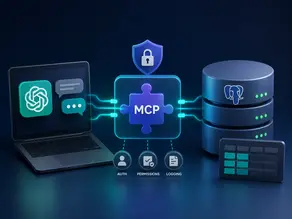
A safer architecture puts an integration layer between ChatGPT and PostgreSQL. With a custom MCP-based app, ChatGPT can call approved tools that interact with your external data or systems. OpenAI currently documents custom apps built with the Model Context Protocol for connecting ChatGPT to external tools and internal data.
The basic flow looks like this:
User
↓
ChatGPT
↓
MCP app
↓
MCP server
↓
PostgreSQL
↓
Query result
↓
ChatGPT
hat distinction matters.
You are not giving ChatGPT unrestricted access to your database. You are giving it access to specific capabilities exposed by your integration.
How The ChatGPT PostgreSQL Connection Actually Works
Think of the MCP server as the controlled doorway.
A user might ask:
“Which five products generated the most revenue last month?”
ChatGPT interprets the request and decides whether an available database tool can help. The MCP layer exposes the approved capability, the server communicates with PostgreSQL, PostgreSQL executes the permitted query, and the result comes back to ChatGPT.
MCP is an open standard designed to connect AI applications with external tools and data. The current MCP specification continues to evolve, including improvements around authorization and server communication.
This is also where I would resist one common temptation.
Do not start by thinking, “How do I give ChatGPT access to everything?”
Start with:
“What is the smallest useful capability I can expose?”
That one change in thinking makes the whole setup easier to secure.
What You Need Before Connecting ChatGPT to PostgreSQL
You will need:
- A PostgreSQL database
- The database host
- The PostgreSQL port
- The database name
- A dedicated database role
- Appropriate permissions
- A secure database connection
- An MCP server or another application layer
- A ChatGPT environment that supports the required app capability
PostgreSQL uses connection parameters for details such as the host, database, user credentials and SSL settings. Its documentation also provides several SSL modes for controlling how encrypted connections are negotiated.
For a remote production database, I would not treat encryption as an optional afterthought.
Create a Dedicated PostgreSQL User for ChatGPT
This is one of the steps I would not skip.
Do not connect your AI integration using the same PostgreSQL account that has unrestricted administrative access.
Create a separate role with only the permissions it actually needs.
For a read-only analytics use case, the basic idea could look like this:
CREATE ROLE chatgpt_reader LOGIN PASSWORD 'YOUR_STRONG_PASSWORD';

GRANT CONNECT ON DATABASE your_database

TO chatgpt_reader;

GRANT USAGE ON SCHEMA public

TO chatgpt_reader;

GRANT SELECT ON ALL TABLES IN SCHEMA public

TO chatgpt_reader;
The password above is only a placeholder. Never put a real production credential inside a tutorial, prompt, screenshot, or public repository.
PostgreSQL supports granular privileges, including CONNECT, SELECT, INSERT, UPDATE, DELETE, CREATE, and others. That makes it possible to design access around the actual job the integration needs to perform.
If ChatGPT only needs to answer questions about your data, SELECT access is usually the sensible starting point.
You can always add more capability later.
Removing unnecessary access after something goes wrong is a much less pleasant exercise.
Connect ChatGPT to PostgreSQL with MCP.
This is the part that changes depending on your exact MCP server implementation, hosting environment and ChatGPT workspace configuration. The underlying pattern remains the same.
1. Prepare your PostgreSQL Connection
Your MCP server needs a way to authenticate with PostgreSQL.
Conceptually, that means providing values such as:
Host: your_database_host

Port: 5432

Database: your_database

User: chatgpt_reader

Password: your_secret

SSL: enabled
Keep credentials outside your source code whenever possible. Environment variables or a proper secret management system are much better choices than hardcoding them.
2. Build or configure the MCP Server
The MCP server becomes the controlled interface between ChatGPT and PostgreSQL.
Instead of exposing the entire database, expose useful operations.
For example:
list_tables

describe_table

run_read_query
You could make the interface even more specific.
For example, instead of allowing arbitrary SQL, you might expose a tool such as:
get_monthly_sales
That approach can be much easier to control because the database operation is defined by your application rather than generated freely every time.
MCP servers can expose tools that AI applications can invoke to interact with external systems.
3. Connect the MCP App in ChatGPT
OpenAI currently documents custom apps built with MCP and provides developer mode for building and testing MCP powered apps. Availability and permissions depend on the ChatGPT plan and workspace configuration.
For example, OpenAI currently states that full MCP support with write and modify actions is available for Business and Enterprise or Edu environments, while Pro users can use MCP connections with read and fetch permissions in developer mode. These capabilities can change as OpenAI continues rolling them out.
That is why I would avoid tutorials that tell readers to follow an old ChatGPT menu path without checking the current interface.
The interface changes.
The architecture matters more.
4. Test the Connection with a Harmless Request
Do not start by asking ChatGPT to modify customer records.
Start with something boring.
Boring is good here.
Try:
“List the tables available to me.”
Then:
“How many customers are in the customers table?”
Then:
“Show the number of new customers grouped by month.”
If those requests return sensible results, you have established the basic path between ChatGPT and PostgreSQL.
What Can ChatGPT Do with PostgreSQL?
Once the integration is working, the useful part begins.
Depending on the tools you expose, ChatGPT can help you:
- Query PostgreSQL data
- Filter records
- Group and aggregate results
- Compare periods
- Identify trends
- Explain query results
- Generate or refine SQL
- Summarize business data
- Answer natural language questions about structured data
For example:
“Which customers placed more than five orders this year?”
Or:
“Compare revenue from the last three months.”
Or something less technical:
“What changed in our sales data this quarter?”
That is where the integration becomes genuinely useful. The person asking the question does not necessarily need to know the exact SQL syntax.
But there is a catch.
A natural language question does not automatically make the resulting SQL correct.
That is something worth remembering.
Should ChatGPT Have Read and Write Access?
For most first implementations, I would say no.
Start with read access.
| Permission | My recommendation | Typical use |
| SELECT | Recommended | Analytics and reporting |
| INSERT | Use carefully | Creating records |
| UPDATE | High caution | Changing existing data |
| DELETE | Avoid initially | Removing records |
There is a psychological trap here.
Once you see ChatGPT successfully retrieve database information, it is tempting to think, “Why not let it update things too?”
Because reading a wrong answer is one problem.
Changing a thousand rows based on a misunderstood request is a completely different problem.
OpenAI’s current MCP documentation describes confirmation and safety considerations for write and modify actions and warns that developers are responsible for evaluating the safety of custom MCP servers and apps they deploy.
If you eventually need write operations, add them deliberately. Use validation, permissions, logging, and appropriate confirmation controls.
How I Would Secure a ChatGPT PostgreSQL Integration
This is the part I care about more than the connection itself.
Use a separate database role
Never give an AI integration your main database administrator credentials.
Start with read-only access
If the goal is analytics, SELECT may be enough.
Restrict the accessible data
You may not need to expose every table and schema.
Sensitive customer information, credentials, internal notes and operational tables should not automatically become available simply because they exist in the database.
Use encrypted connections
PostgreSQL supports SSL and TLS based connection security. Its current documentation includes require, verify CA and verify full modes for progressively stronger certificate verification.
Keep credentials out of prompts
A database password is not something ChatGPT needs to know conversationally.
The integration should handle authentication.
Log important operations
If an AI system can query valuable business data, you should know what it is doing.
Be careful with arbitrary SQL
A tool that accepts completely unrestricted SQL deserves much more scrutiny than a small collection of narrowly defined database operations.
Test outside production first
Use a development database or controlled dataset.
I have seen enough systems fail because everyone wanted to test against the real thing immediately. It saves five minutes at the beginning and can create a very long evening later.
Common ChatGPT PostgreSQL Connection Problems
When the connection fails, the error is often much less mysterious than it looks.
| Problem | What to check |
| Connection refused | Host, port, firewall and PostgreSQL service |
| Authentication failed | Username and password |
| Permission denied | PostgreSQL role privileges |
| SSL error | SSL configuration and certificates |
| Table not found | Schema and table names |
| Query error | SQL syntax and column names |
| Timeout | Network connectivity or query performance |
For example, if the database is reachable but the user cannot access a table, changing the MCP configuration may not fix anything.
The PostgreSQL role may simply lack the required privilege.
This sounds obvious after you know it.
It is surprisingly easy to miss while troubleshooting.
Common Mistakes When Connecting ChatGPT to PostgreSQL
The first ChatGPT mistake is giving too much access too early.
It feels convenient. It is not.
The second is assuming generated SQL is automatically safe because it looks correct. SQL can be syntactically valid and still produce the wrong result or perform an operation you never intended.
The third is connecting to production before proving the workflow.
Build the smallest version first. Get one safe query working. Then expand.
The fourth is probably the most important:
Do not confuse database connectivity with database integration.
A successful connection only proves that two systems can communicate.
A useful integration means the right data is accessible, the right actions are available, permissions are appropriate, errors are handled, and the results can be trusted.
That difference becomes very obvious once you move beyond a simple demonstration.
ChatGPT PostgreSQL integration vs a generic database connection
If you have already read a general guide about connecting ChatGPT to databases, this article intentionally goes deeper into PostgreSQL.
The generic concept is broader.
This implementation is PostgreSQL-specific.
Here we are dealing with PostgreSQL roles, privileges, schemas, SSL configuration, SQL execution, and an MCP-based integration path. That is why I would treat PostgreSQL as its own implementation rather than simply another example inside a generic database article.
Final takeaway
Connecting ChatGPT to PostgreSQL is not really about making an AI talk to a database.
The useful part is building a controlled bridge between natural language and structured data.
Start small.
Give ChatGPT only the access it needs. Use a dedicated PostgreSQL role. Keep the first version read only. Test it against controlled data. Then expand the integration when you have a real reason to do so.
That approach may feel slower on day one.
In practice, it usually saves a lot of trouble later.
Frequently asked questions
Can ChatGPT connect directly to PostgreSQL?
ChatGPT should not be treated as a PostgreSQL client where you simply provide unrestricted database credentials. A controlled integration layer can expose approved PostgreSQL capabilities to ChatGPT. MCP is one current way to build that kind of custom app.
Can ChatGPT query PostgreSQL data?
Yes, when the connected app or MCP server exposes the required database functionality and the PostgreSQL role has the necessary permissions. The exact capabilities depend on how the integration is designed.
Is MCP required to connect ChatGPT to PostgreSQL?
Not for every possible architecture. You can build your own application using an API and database layer. MCP is particularly relevant when you want ChatGPT to interact with external tools and data through a standardized tool interface.
Is it safe to give ChatGPT PostgreSQL access?
It can be made safer with a dedicated role, least privilege permissions, encrypted connections, restricted data access, logging and careful tool design. I would start with read only access rather than unrestricted write access.
Can ChatGPT write data to PostgreSQL?
Custom MCP apps can support write and modify actions in environments where the required functionality is available. OpenAI currently provides additional confirmation and safety controls around such actions.

He is an AI & Technology Content Specialist covering generative AI, ChatGPT, AI tools, automation, and emerging technologies. His work focuses on researching complex AI developments and turning them into practical, easy-to-understand insights.


Pingback: How to Build an AI SQL Chatbot Step by Step