Key Takeaways:
- AI prompt platforms turn repetitive verification tasks into structured, reusable workflows.
- AI can organize verification steps but cannot replace authentication systems or identity assurance.
- Structured prompts improve verification consistency, result handling, fallback logic, and workflow documentation.
- AI can assist with document analysis, data validation, anomaly detection, and human review.
- Reliable AI verification requires human oversight, secure data handling, validation, and fallback processes.
AI prompt platforms are changing online verification workflows by turning repetitive manual steps into structured, reusable workflows. They help teams organize instructions, analyze verification data, trigger tools, handle failures, and route uncertain cases to a human.
But here is the part people often miss. AI prompt platforms do not replace the systems that actually authenticate users, verify documents, or establish identity assurance.
In this blog, you will learn how AI prompt platforms work, how they fit into verification workflows, where they truly help, and where a human is still needed.
What Are AI Prompt Platforms?
Let us start simple. A prompt is just an instruction. You type it, and an AI model reads it and responds.
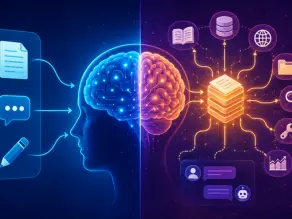
An AI prompt platform is different from a normal chatbot. It is not built for one question and one answer. It is built to hold instructions, save them, and use them again.
Think of it like this. A chatbot is like asking a friend one question. An AI prompt platform is like handing a new employee a written checklist. The checklist does not change every time. It just gets followed, step by step, again and again.
This is the real value of AI prompt platforms. They turn scattered instructions into a structured, reusable workflow.
| Traditional AI interaction | Prompt platform workflow |
| One-time instruction | Reusable instruction |
| Manual decisions | Structured steps |
| Ad hoc execution | Repeatable workflow |
| Single response | Multi-step process |
Once a task is saved as a structured prompt, it can be reused without rewriting the instructions each time. Some platforms then trigger it automatically. Others still need a person to run it. Either way, the instructions do not have to be rebuilt from scratch.
How Does AI Process a Prompt?
You type something. The AI does not just “read” it like a person reads a text message. There are steps behind it.
Here is the simple flow.
- You write a prompt.
- The AI model processes what you are asking.
- It handles any context or data you gave it.
- It generates an output based on that.
- If the platform supports it, that output is passed to a tool or system to take action.
Different AI systems handle this a little differently under the hood. Some lean more on pattern matching, some use extra reasoning steps, and some call external tools directly. The exact process depends on the model and the platform.
But here is what stays true across most of them. An AI model can understand a request. It cannot, by itself, check a document, send an OTP, or confirm an identity. Those actions still need an outside system, an API, a database, or an authentication service doing the real work.
So the AI is not doing verification by itself. It is guiding the process and calling in the right tools when needed.
My Take: People often assume AI does everything end to end. It does not. It is more like a smart assistant that hands off the hard, sensitive parts to the systems built for them.
How AI Prompt Platforms Structure Online Verification Workflows
This is where things get practical. But first, a quick definition, because it helps everything below make sense.
Online verification is the process of checking whether submitted information, credentials, documents, or authentication factors meet a defined requirement. Depending on the workflow, that might mean confirming an OTP, checking a document, matching a database record, running an authentication step, or sending the case to a human reviewer.
Now let us compare the old way and the new way.
Traditional verification workflow: The user signs up, enters a phone number or email, receives an OTP, confirms it, and gets access.
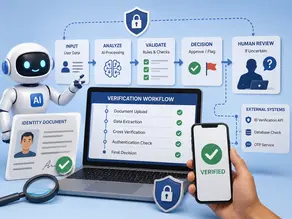
AI prompt-driven workflow: A prompt defines the verification steps. It guides or triggers actions. It receives a result. It checks that result. Then it continues or falls back to another path.
Defining verification steps
The first job of a prompt is to lay out exactly what needs to happen. Which field gets checked first? What counts as a pass? What counts as a fail.
Without this, an AI model is just guessing.
Standardizing repetitive workflows
Verification is repetitive by nature. The same checks run for user one hundred and user one hundred and one.
A structured prompt makes sure the process does not quietly change from one run to the next. That consistency is honestly the biggest win of prompt-driven workflows, similar to how structured prompts help in supply chain risk analysis.
Handling verification results
Once a check runs, something has to happen with the result. Pass, fail, or unclear.
A good AI prompt platform routes each outcome to the right next step, instead of leaving it hanging.
Adding fallback logic
Things fail. An SMS does not arrive. A document scan is blurry. A server times out.
Fallback logic means the workflow has a plan B. Retry, escalate, or ask the user to try a different method.
Logging and documenting workflow outcomes
Every verification attempt should leave a trail. Who was checked, when, and what happened. This audit trail matters for compliance and for fixing problems later.
Separating AI instructions from verification rules
This distinction sounds small, but it is one of the most important ideas in this whole article.
A prompt is just an instruction. It tells the AI what to do and in what order.
A verification rule is the actual requirement. Something like: this document must show a matching name and a valid date.
An external system, an API, a database, or an authentication service, is what actually confirms whether that rule was met.
Mixing these three up is where things go wrong. The prompt should never be treated as the rule itself, and it should never be treated as the proof either. It is just the layer that organizes the other two.
How Is AI Used in Verification and Validation?
This question comes up a lot, so let us answer it directly.
AI is used to support verification and validation in a few clear ways.
- Checking if data is consistent across fields
- Reading and analyzing documents
- Spotting anomalies that look out of place
- Supporting rule-based checks
- Generating test cases for QA teams
- Reviewing workflow outputs before they reach a human
- Helping human reviewers work faster, not replacing them
Here is the part people often miss. AI-assisted verification is not the same as authoritative identity verification.
The National Institute of Standards and Technology, or NIST, has a resource center dedicated to testing, evaluation, verification, and validation (TEVV) of AI systems themselves. That work is about checking whether an AI system behaves the way it is supposed to. It is not the same as saying an AI-powered verification workflow is automatically accurate. Those are two different kinds of validation, and it helps to keep them separate.
How to Use AI for Verification Without Replacing Human Oversight
This is probably the most important section of this whole blog. Because getting this wrong is where teams get into trouble.
Here is a safer way to think about it.
- Define exactly what needs to be verified.
- Decide what counts as acceptable proof or evidence.
- Give the AI clear, structured instructions.
- Let the AI organize and analyze the information.
- Apply firm, rule-based checks where the risk is high.
- Send uncertain or risky cases to a human.
- Keep a record of every decision made.
| AI can help with | AI should not automatically decide |
| Extracting information | Final identity assurance |
| Comparing fields | High-risk decisions without controls |
| Flagging inconsistencies | Trustworthiness of unknown evidence |
| Organizing the workflow | Overriding verification policy |
A common mistake I keep seeing: teams treat a well-written prompt as if it were a full verification system. It is not. A prompt organizes the work. It does not carry legal or security weight on its own.
How Can AI Be Used to Verify Documents?
Document checks are one of the clearest use cases for AI prompt platforms, so let us slow down here.
The flow usually looks like this.
A document is uploaded, text is pulled out using OCR, fields are compared against expected values, consistency checks run, and anything odd gets flagged for review.
What AI actually helps with here:
- Reading text off scanned images through OCR
- Pulling out fields like name, date, or ID number
- Matching those fields against what was expected
- Classifying what type of document it is
- Flagging mismatches or missing information
- Assigning a confidence score to the result
Now, the limitation, and it is a real one. A high confidence score is not the same as proof of identity.
Authentication and identity proofing are not the same thing
These two words get mixed up all the time, so let us separate them.
Authentication asks a simple question. Are you the same user who owns this account?
Identity proofing asks a harder question. Can we actually establish that this real-world identity belongs to this person?
AI can support both. It can help compare login patterns for authentication, and it can help extract and compare fields for identity proofing. But it does not decide either one on its own.
NIST’s current digital identity guidelines, SP 800-63A 4, focus specifically on identity proofing and enrollment. They set out what is actually required to establish a real level of identity assurance. That is a much higher bar than a confidence percentage from a model.
Where AI Prompt Platforms and Verification Workflows Intersect
AI prompt platforms are not stuck in one industry. Here is where they show up most.
| Use case | AI prompt role | Verification role | Benefit |
| SaaS testing | Defines test sequence | Tests authentication | Faster QA |
| Document workflow | Defines checks | Compares fields | More consistency |
| Onboarding | Structure steps | Validates inputs | Less manual work |
| QA and regression | Generates scenarios | Tests expected outcomes | Better coverage |
What Changes When Verification Becomes Prompt-Driven?
Here is the deeper shift, beyond just speed.
Before: A human decides the steps. A human carries out most actions. Verification happens manually, one case at a time.
With prompts: A prompt holds the logic. Tools carry out the steps, much like batch processing handles repetitive business tasks automatically. Verification runs, gets checked, and falls back if something goes wrong.
What actually changes:
- Workflows become more repeatable
- Steps get standardized instead of improvised
- Testing gets easier, since the same prompt can be reused
- Documentation almost happens on its own, since the steps are written down
- Iteration is faster because you edit a prompt instead of retraining a whole team
One thing I have noticed while working with structured workflows like this is that the biggest gain is rarely speed alone. It is consistency. When the same steps run the same way every time, failures become much easier to spot and fix.
What AI Prompt Platforms Cannot Do in Verification?
This section matters, and honestly, it does not get talked about enough.
- AI cannot guarantee that an SMS actually gets delivered.
- AI cannot confirm someone’s identity is genuine, only that the data looks consistent.
- AI cannot control what a third-party verification system decides.
- AI cannot override a platform’s own security policy.
- AI output can simply be wrong.
- External data it relies on can be incomplete or outdated.
- Verification rules differ by system and by country.
- Human escalation is often still required for anything risky.
NIST’s AI Risk Management Framework was built around this exact idea, managing AI risk responsibly across the full life of a system, not just trusting an output because it sounds confident.
Security, Privacy, and Reliability Risks
Any honest article on this topic has to cover risk. Skipping it would be a disservice.
Sensitive verification data
Verification often involves personal data. Names, ID numbers, and sometimes documents. That data needs to be handled carefully inside any AI workflow.
Prompt injection and untrusted inputs
If a workflow accepts input from users, someone may try to sneak in instructions meant to trick the AI. This is called prompt injection, and it is a real, documented risk.
Incorrect outputs and data leakage
Models can make mistakes. Sensitive details can also leak if a workflow is not designed carefully.
Third-party dependency and auditability
Most verification workflows depend on outside systems. If one goes down, the workflow needs a plan. And every step should be logged for later review.
| Risk | Potential impact | Practical mitigation |
| Untrusted input | Manipulated workflow | Validate all inputs. |
| Sensitive data exposure | Privacy risk | Minimize what data is shared. |
| Model error | Incorrect result | Add human review. |
| External system failure | Workflow interruption | Build fallback logic |
The OWASP Foundation publishes detailed guidance on large language model security, including prompt injection risks, and it is worth a read if you are building anything at scale.
AI-Assisted Verification vs Traditional Verification
Let us be fair here. Neither approach wins on every point.
| Factor | Traditional workflow | AI-assisted workflow |
| Instructions | Written manually each time | Prompt-driven and reusable |
| Repetition | High, done by hand | Lower, automated |
| Standardization | Varies by person | More consistent |
| Analysis | Mostly human | AI-assisted |
| Exceptions | Handled manually | Can be routed automatically |
| Final assurance | Rests with system or human | Still rests with system or human |
Notice that last row. Final assurance does not move. AI prompt platforms change the layer above verification: the instructions and the flow. They do not replace what sits underneath.
Best Practices for Building Reliable AI Verification Workflows
If you are actually setting one of these up, here is a practical checklist.
- Define the exact verification objective first.
- Keep instructions separate from actual evidence data.
- Use structured, written prompts, not loose one-line requests.
- Validate every external input before trusting it.
- Define clear failure conditions ahead of time.
- Build a real fallback path, not just a hope that nothing breaks.
- Keep humans in the loop for anything high risk.
- Log every important event in the workflow.
- Test edge cases, not just the happy path.
- Review the whole workflow on a regular schedule.
NIST’s AI Risk Management Framework is a solid reference point here, since its whole purpose is helping organizations manage AI risk and build trustworthy practices into daily use, not just theory.
Common Mistakes When Using AI for Verification
I will be direct here, because these mistakes show up constantly.
- Assuming AI output is automatically accurate. It is not. It is a starting point, not a final answer.
- Treating a prompt as if it were a full verification system. A prompt organizes steps. It does not replace identity checks or security controls.
What I would do instead: treat the prompt as the instruction layer, and keep your actual verification tools doing the actual verifying. - Ignoring what happens when an external system fails. No fallback plan means the whole workflow just stops.
- Putting sensitive information into prompts that do not need it. Less exposure is always safer.
- Automating high-risk decisions with no human review at all. Speed is nice. But some decisions deserve a second pair of eyes.
- Only testing the successful path. Real users hit weird edge cases constantly. Test for those too.
The Future of AI Prompt Platforms in Verification
Where is this heading? A few honest trends worth watching.
- More agentic workflows, where AI takes several small actions on its own
- Wider use of tool calling, so AI can reach out to systems directly
- Better multimodal document analysis, handling images and text together
- More automated testing baked into everyday workflows
- Continued reliance on human-in-the-loop review for anything sensitive
- Workflows that are more aware of policy and compliance rules
- Smarter, more adaptive fallback systems
The future is not AI replacing verification. It is AI becoming the layer that organizes verification around it.
Conclusion
AI prompt platforms are changing verification workflows by turning repetitive checks into structured, reusable processes.
They can organize prompts, analyze data, support document verification, trigger tools, and route uncertain cases for human review. But they do not replace authentication systems, identity proofing, APIs, databases, or established security controls.
The strongest workflows combine AI automation with validation, fallback logic, privacy safeguards, and human oversight.
Ultimately, AI works best as the orchestration layer around verification, not as the final authority on trust.
FAQs
How is AI used in verification and validation?
AI supports verification and validation by checking data consistency, reading documents, spotting anomalies, and helping human reviewers work faster. It does not replace formal identity assurance on its own.
How to use AI for verification?
Define what needs checking, give the AI clear instructions, let it organize and analyze information, apply firm rules for high-risk cases, and send anything uncertain to a human reviewer.
How does AI process a prompt?
At a high level, an AI model processes the prompt together with any available context and generates an output. Some platforms then let that output trigger a tool or an outside system to take action.
How can AI be used to verify documents?
AI can read text using OCR, extract fields, compare them to expected values, and flag inconsistencies. A confidence score from AI is not the same as proof of identity.

He is an AI & Technology Content Specialist covering generative AI, ChatGPT, AI tools, automation, and emerging technologies. His work focuses on researching complex AI developments and turning them into practical, easy-to-understand insights.