
Key Takeaways:
- Choose AI tools based on your store’s biggest problem, not the number of features they offer.
- Start with one AI tool, measure results, and expand only when it creates clear business value.
- Keep humans involved in product claims, refunds, complaints, pricing decisions, and other sensitive ecommerce tasks.
- Clean product data and reliable workflows are essential before adding AI automation to your ecommerce operations.
- Use AI to reduce repetitive work, improve customer experiences, increase retention, and support smarter ecommerce decisions.
I still remember the first time a client asked me, “which AI tool should my store actually use?”
I did not have a clean answer. Nobody really does, because every store is different.
That question stuck with me for years. After testing dozens of tools across real client stores, watching some succeed and some quietly get abandoned after a month, I finally have an honest answer for you.
This guide is not a random tool list copied off Google. Every pick here is judged against one question. Does this tool actually solve a real ecommerce problem, or does it just look impressive on a landing page?
If you run a small shop or a big online store, you are probably tired of hearing “AI will change everything” without anyone explaining how, or why one tool might be wrong for your business.
So let us slow down and talk about the Best AI Tools for eCommerce Businesses in a way that actually helps you decide.
How We Selected the Best AI Tools for Ecommerce
I do not rank a tool just because it has more AI features than the next one.
- I look at whether it solves a real ecommerce workflow, how well it fits into a store already running on Shopify or WooCommerce, and how much manual work it actually removes.
- Every tool on this list was checked against the same criteria. Ecommerce use case. Ease of setup. Integration quality. Automation depth. Pricing as a store grows. How much human review it still needs.
- I did not give extra points to a tool simply because it had the flashiest AI demo. I gave points to tools that solve an actual expensive problem.
- Pricing and features on this page were checked in August 2026. AI tools move fast, so always confirm current pricing on the tool’s own site before buying.
Quick Answer Best AI Tools for eCommerce Businesses at a Glance
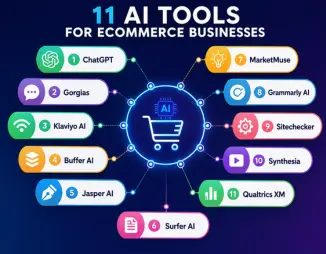
If you are short on time, here is the fast version.
| Tool | Best for | Store size | My verdict |
| ChatGPT | General ecommerce tasks | Any size | Strong all rounder |
| Gorgias | Customer support | Small to large | Best for support |
| Klaviyo AI | Email and retention | Small to large | Best for lifecycle marketing |
| Buffer AI | Social media posting | Small to mid | Best for staying consistent |
| Jasper AI | Product and brand copy | Small to large | Best for scaling content |
| Surfer AI | SEO content writing | Small to mid | Best for ranking pages |
| MarketMuse | Content strategy | Mid to large | Best for content planning |
| Grammarly AI | Writing quality checks | Any size | Best final check tool |
| Sitechecker | Technical SEO health | Any size | Best maintenance tool |
| Synthesia | Product video | Small to mid | Best for video without a studio |
| Qualtrics XM | Customer feedback | Mid to large | Best for deep customer data |
My three quickest recommendations. If you run a small Shopify store, start with Gorgias or Klaviyo AI. If customer support is eating your day, start with Gorgias. If repeat purchases feel low, start with Klaviyo AI.
Is Your Ecommerce Store Ready for AI Tools
Before you buy anything, answer this honestly.
- Is your product data clean and consistent across your catalog?
- Do you have accurate inventory numbers that update regularly?
- Are your customer support answers already written down somewhere, even in a messy document?
- Do you know the one metric you actually want to improve first?
If your answer to most of these is no, fix the workflow before you automate it. AI on top of a messy process just makes the mess move faster.
How AI Tools Improve the Ecommerce Customer Journey
Rather than list generic AI abilities, it helps to see where AI touches a real customer journey.
Before a purchase, AI helps with product discovery, recommendations, and answering quick questions.
During a purchase, AI personalizes offers and helps recover an abandoned cart before it is lost.
After a purchase, AI handles order tracking, return questions, and review requests.
Behind the scenes, AI supports content production, technical SEO checks, and customer feedback analysis.
Seen this way, the real question is not “should I use AI.” It is “which part of my customer journey is currently broken, and which tool actually fixes that part.”
AI Assistants vs AI Powered Ecommerce Apps vs AI Agents
These terms get mixed up a lot, so let me clear it up quickly.
| Type | What It Does | Data Access | Example |
| AI Assistant | Helps with writing, brainstorming, research, and general tasks. | Does not automatically access your store or order data unless you provide it. | ChatGPT |
| AI Powered Ecommerce App | Uses AI within your ecommerce platform to handle tasks using business data. | Can access real orders, customers, tickets, and store data. | Gorgias, Klaviyo AI |
| AI Agent | Can understand a goal, make decisions, use connected tools, and complete tasks with limited human input. | Can access and act on connected business systems based on permissions. | An ecommerce support agent that checks an order, applies a return policy, and starts a refund |
Best AI Tool for eCommerce Customer Support
The problem. Support tickets pile up fast, and most of them ask the same five or six questions over and over.
The use case. You need a tool that answers repeat questions instantly, while still handing off tricky cases to a real person.
Gorgias
Gorgias is built specifically for ecommerce support teams and connects directly with Shopify, so agents see order details right inside every ticket.
Why does it work? It automates the boring, repeated questions like “where is my order” or “how do I return this,” and it learns your store’s tone over time instead of sounding robotic.
Limitation. Pricing climbs quickly once your ticket volume grows, so it can get expensive for a store scaling fast.
Who should use it. Stores with steady order volume where support tickets are already eating up a lot of staff hours.
Alternative. If your ticket volume is still very low, you may not need a dedicated tool yet. ChatGPT can help you draft quick, consistent replies in the meantime.
My verdict. If support tickets are draining your team, Gorgias usually pays for itself within a couple of months.
Best AI Tools for eCommerce Marketing and Retention
The problem. Getting a customer back to buy again is far cheaper than finding a new one, but most stores never follow up at the right moment.
The use case. You need a tool that studies buying behavior and reaches out at the exact point a shopper is likely to return.
Klaviyo AI
Klaviyo has been an ecommerce favorite for years, and its AI features made the timing side much smarter.
Why does it works. It studies each customer’s shopping behavior and predicts which products a shopper is most likely to come back for, which makes abandoned cart recovery noticeably stronger.
Limitation. The interface can feel overwhelming if you have never used email marketing software before, so expect a small learning curve.
Who should use it. Stores that already have a decent email list and want smarter timing without hiring a marketing analyst.
Alternative. If your list is still small, Buffer AI might be a lighter starting point while you build up your customer base first.
My verdict. Klaviyo AI is one of the fastest ways to turn old customers into repeat buyers without adding manual work.
Buffer AI
Buffer AI handles the social side of staying in front of your customers, without you sitting on every platform daily.
Why does it works. It suggests captions, picks good posting times, and keeps your brand active across channels on something close to autopilot.
Limitation. It is quite simple, which can feel limiting for a larger team managing several brands at once.
Who should use it. A small store owner juggling ten jobs who keeps letting social media slide to the bottom of the list.
Alternative. ChatGPT can also draft social captions, but Buffer AI adds the scheduling and timing piece ChatGPT does not do on its own.
My verdict. Simple, dependable, and worth it if social posting keeps getting skipped.
Best AI Tools for Product Content and Copy
The problem. Writing product descriptions for hundreds of items by hand takes forever, and generic copy does not sell.
The use case. You need a tool that writes fast while still sounding like your brand, then a way to double check the final version.
Jasper AI
Jasper focuses on marketing copy, including product descriptions, ad text, and email subject lines.
Why does it work? Its brand voice feature keeps writing consistent across hundreds of products once it is trained on your tone.
Limitation. Without a clear prompt, output can feel generic. It takes some learning to get sharp, specific copy out of it. This is where the difference between context engineering vs prompt engineering really shows, since the way you frame the instructions changes the quality of what you get back.
Who should use it. Stores producing a lot of product content who need consistent brand voice without hiring a full writing team.
Alternative. ChatGPT can do similar drafting work for free, though Jasper’s brand voice training is more consistent over time.
My verdict. Strong choice once you learn how to prompt it well, weaker if you expect perfect output with no editing.
ChatGPT
ChatGPT deserves its own space because it does not fit neatly into one category. Store owners use it for brainstorming names, drafting FAQs, writing quick replies, and researching competitors.
Why does it work? It is flexible enough to help with almost any writing or thinking task in your store, at a low starting cost.
Limitation. Without clear instructions, answers can drift or include small factual errors. AI tools can sometimes state something confidently that is simply wrong, so it helps to know how to avoid AI hallucinations before publishing anything it wrote about your products or policies.
Who should use it. Any store owner who wants one flexible tool for daily writing and thinking tasks.
Alternative. For deep, ecommerce specific automation, tools like Gorgias or Klaviyo AI outperform ChatGPT because they connect directly to your store data. If you are wondering which AI is better than ChatGPT for a specific job, the honest answer is it depends on the task.
My verdict. A great starting point for almost every store, but not a replacement for tools built specifically for ecommerce workflows. For a deeper walkthrough on getting more out of it, this complete ChatGPT guide covers setup and prompting in more detail.
Grammarly AI
Grammarly AI is the final check before anything from your store goes public.
Why does it works. It catches grammar mistakes, awkward phrasing, and tone issues across product pages, emails, and social captions.
Limitation. It checks quality, not accuracy. It will not catch a wrong price or a false product claim, only how the sentence reads.
Who should use it. Every store, honestly. Even strong writers miss small mistakes when they are tired.
Alternative. There is no real substitute here. Even AI generated copy from Jasper or ChatGPT should still pass through a tool like this before publishing.
My verdict. A small, cheap step that quietly protects your brand from careless mistakes.
Best AI Tools for eCommerce SEO
The problem. Traffic feels stuck, and nobody on the team has time to dig through technical SEO issues or plan a content strategy.
The use case. You need tools that guide your writing toward what actually ranks, plus something that catches technical problems before they cost you traffic.
Surfer AI
Surfer AI blends content writing with SEO scoring. As you write, it shows what topics and terms are missing compared to top ranking pages.
Why does it works. It is great for product category pages and blog content tied to your store, giving clear direction instead of guessing.
Limitation. It can push writers toward stuffing keywords if you follow the score too literally. Use it as a guide, not a strict rule.
Who should use it. Stores actively publishing blog or category content who want a clearer roadmap for ranking.
Alternative. MarketMuse works better if you need a bigger picture content plan rather than page by page scoring.
My verdict. A useful writing companion, as long as you do not let the score override common sense.
MarketMuse
MarketMuse is more of a content strategy brain than a writing tool. It maps out what topics your store should cover and where competitors have gaps.
Why does it works. It helps you plan an entire content library instead of guessing what to write next.
Limitation. This is not for someone writing one blog post a month. It shines for stores building content steadily over time.
Who should use it. Growing stores with a real content plan and someone dedicated to publishing regularly.
Alternative. Surfer AI is lighter and more useful if you just need help with one page at a time.
My verdict. Overkill for a tiny store, genuinely useful for a store serious about content as a growth channel.
Sitechecker
Sitechecker handles the technical side most people forget about, things like broken links, slow pages, missing meta tags, and duplicate content.
Why does it works. For stores with hundreds of products, technical issues pile up fast without anyone noticing until traffic quietly drops.
Limitation. It finds problems, it does not fix your content or strategy. Think of it as maintenance, not growth.
Who should use it. Any store with a large catalog that has not run a technical SEO check in months.
Alternative. There is no strong substitute here among these tools. Manual audits take far longer and miss things a crawler catches instantly.
My verdict. Not exciting, but it quietly protects the traffic you already worked hard to earn.
Best AI Tool for Product Video
The problem. Video content converts well, but hiring a video team or renting a studio is expensive and slow.
The use case. You need product explainer or FAQ videos without the full production cost.
Synthesia
Synthesia turns written scripts into talking avatar videos without a camera, studio, or actor.
Why does it works. Stores use it for product explainer videos, FAQ videos, and onboarding content for new customers.
Limitation. The avatars have gotten more natural over the past year, but they still feel slightly stiff compared to a real person on camera.
Who should use it. Stores that want video content but do not have the budget or time for full production.
Alternative. For stores with a real budget, a short real person video will usually connect better with shoppers than an avatar.
My verdict. A smart shortcut for stores that would otherwise have no video at all.
Best AI Tool for Customer Analytics
The problem. You have data, but you do not really know why customers are happy or frustrated.
The use case. You need a tool that turns feedback and surveys into a clear picture of the customer experience.
Qualtrics XM
Qualtrics XM digs into customer experience data, pulling surveys, feedback, and sentiment into one place.
Why does it works. It tells you not just what customers are doing, but why they might be frustrated or delighted, which basic analytics cannot show you.
Limitation. This tool leans enterprise. Smaller stores might find the pricing steep for what they need day to day.
Who should use it. Larger stores past the point of guessing what customers think, who need real structured feedback data.
Alternative. A smaller store can start with simple post purchase surveys and only move to Qualtrics XM once feedback volume grows.
My verdict. Expensive for a small shop, genuinely valuable once your customer base is big enough to need real data.
Best Ecommerce AI Tools by Business Goal
Sometimes the fastest way to choose is to start with your goal, not the tool.
| Your problem | Start with | Why |
| Too many support tickets | Gorgias | Automates repeat questions |
| Low repeat purchases | Klaviyo AI | Smarter timing and recovery |
| Social media keeps slipping | Buffer AI | Keeps posting consistent |
| Boring product pages | Jasper AI plus Grammarly AI | Faster copy, cleaner final check |
| Traffic feels stuck | Surfer AI and Sitechecker | Content plus technical fixes |
| No video budget | Synthesia | Scripts turned into video |
| Need deeper customer insight | Qualtrics XM | Structured feedback data |
Ecommerce Tasks to Automate With AI and Keep Human
Learn which ecommerce tasks AI can handle efficiently and where human judgment still matters most.
| Task | AI role | Human role |
| Product description draft | Writes the first draft | Checks facts and claims |
| Order status updates | Handles it fully | Steps in for escalations |
| Refund exceptions | Suggests an action | Makes the final call |
| Customer complaints | Drafts a response | Adds empathy and judgment |
| Product recommendations | Personalizes automatically | Monitors overall results |
| Brand strategy | Assists with research | Owns the final decision |
I would not hand pricing exceptions, legal questions, or emotional complaints fully to AI. Those still need a real person paying attention.
Common Ecommerce AI Mistakes Store Owners Should Avoid
Avoid costly AI mistakes like buying too many tools, skipping reviews, and automating bad workflows.
- Buying too many tools at once is the biggest one. Pick a single problem and solve it before adding another tool.
- Publishing AI written content without a human review comes right after that. Even the best tool can get a product detail wrong.
- Ignoring messy product data is another common trap. If your catalog information is inconsistent, no AI tool can clean that up for you on its own.
- Measuring how much a tool gets used instead of measuring actual results. Usage numbers look nice in a report, but they do not pay bills.
- A mistake I would personally avoid is giving AI too much control too early. Start with AI assisting a human, not replacing one, and expand from there once you trust the output.
How AI Search Is Changing Ecommerce SEO
Search behavior is shifting. People now type full questions instead of short keywords, and Google’s AI Overviews and AI Mode try to answer those questions directly.
Google has stated there are no special technical requirements just to appear in AI Overviews or AI Mode. The same foundational SEO practices still apply, things like proper indexing, helpful content, and a good page experience, as explained on Google’s own AI features page.
For ecommerce sites specifically, Google recommends structured data so search engines understand product details like price, availability, and reviews more accurately, according to Google’s guidance on structured data for ecommerce sites.
This means chasing AI search shortcuts is not the answer. Focusing on genuinely useful, accurate content for real shoppers is still what works best.
My Final Thoughts
The Best AI Tools for eCommerce Businesses are not the ones with the flashiest features. They are the ones that solve a real problem in your store without adding extra work.
Start with the tool closest to your most expensive problem, not the tool with the best marketing page.
If support tickets are draining your day, start with Gorgias. If repeat purchases feel weak, start with Klaviyo AI. If your content pipeline feels slow, layer in Jasper AI, Surfer AI, and Grammarly AI together.
My honest opinion after years of testing these tools, do not chase every new AI release. Chase the problem that is actually costing you money right now, then find the tool built to fix exactly that.
That mindset alone will save you more time and money than any single tool on this list.
FAQs About AI Tools for Ecommerce Businesses
1. Can AI tools access my customer and order data safely?
Most ecommerce AI tools use permissions and integrations to access only the data they need. Still, check data handling, security controls, and privacy terms before connecting sensitive store information.
2. Will AI replace my ecommerce support team?
AI is more useful for handling repetitive questions than replacing your entire support team. Human agents should still handle complaints, complex refunds, sensitive issues, and unusual customer requests.
3. Can AI accidentally publish wrong product information?
Yes. AI can create confident but incorrect details about prices, stock, product features, or policies. Human review is important before publishing AI generated ecommerce content.
4. How much does AI really reduce ecommerce costs?
The savings depend on the workflow you automate. Support automation can reduce manual ticket work, while marketing and content tools can save hours that your team can spend on higher value tasks.
5. Should I connect AI directly to my Shopify or WooCommerce store?
Connect AI only after you understand what data and actions the tool can access. Start with limited permissions and test the workflow before allowing AI to perform actions automatically.
6. What happens if an AI tool gives my customer the wrong answer?
A good setup should include human escalation for uncertain or sensitive cases. You should also monitor AI responses regularly and update your store policies or knowledge base when information changes.
7. Is using several AI tools better than using one platform?
Not necessarily. Too many disconnected tools can create duplicate work, higher costs, and messy data. Start with one expensive problem and add another tool only when there is a clear business reason.
8. Can small ecommerce stores afford AI tools?
Yes, but small stores should focus on tools that solve a measurable problem first. A simple AI tool that saves several staff hours each week can be more valuable than an expensive platform with features you rarely use.

He is an AI & Technology Content Specialist covering generative AI, ChatGPT, AI tools, automation, and emerging technologies. His work focuses on researching complex AI developments and turning them into practical, easy-to-understand insights.