Key Takeaways
- Generative AI helps businesses create content faster, but human expertise is still needed to maintain brand voice, originality, and customer trust.
- The best AI content workflows combine clear goals, strong prompts, human editing, fact checking, and performance tracking.
- Businesses should use AI for drafting, personalization, research, and repurposing instead of treating it as a complete content replacement.
- Brand guidelines and human review are essential to prevent generic AI content that does not connect with the target audience.
- AI delivers the best results when businesses use it as a creative partner that improves productivity without removing human judgment.
Most companies want more content. More blogs, more posts, more emails. But there is a real fear sitting under all that ambition.
Will the content still sound like us? I have sat in enough content meetings to know this question comes up almost every time someone mentions AI tools.
After working closely with content teams testing these tools, one thing became clear to me.
Businesses do not struggle because generative AI for content creation cannot produce text.
They struggle because they do not know how to blend that output with something human.
This article is not another explainer about what AI can technically do.
It is about how real teams are using it, where they mess up, and what actually works when the goal is content people trust.
What Is Generative AI for Content Creation
At its core, generative AI uses large language models and machine learning algorithms to produce text, images, video, or audio.
You give it a prompt. It gives you something back.
Sounds simple. It is not always simple in practice.
One thing I noticed early on, while testing different tools, is that people expect one perfect prompt to give one perfect answer.
That rarely happens.
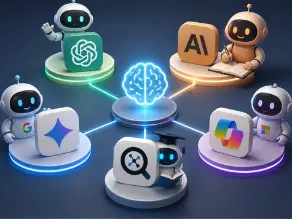
Natural language processing has gotten better. Neural networks behind tools like ChatGPT, Google Gemini, and Microsoft Copilot can mimic human writing patterns fairly well now.
But there is a catch.
AI predicts patterns from training data. It does not feel anything. It does not remember your last customer call or the joke your founder made in a meeting last week.
That gap matters more than most people admit.
Why Businesses Are Adopting AI for Content Creation
Content teams are tired. Genuinely tired.
Everyone wants blogs, social posts, email campaigns, video scripts, and product pages, all at the same time.
That pressure is the real reason adoption is climbing so fast.
Faster Content Production
Drafts that once took a full day can now take an hour. Not perfect drafts. But a starting point.
Lower Content Creation Costs
Smaller teams can produce more without hiring five extra writers.
Better Personalization
AI models can adjust tone for different buyer personas quickly, something manual writing struggled to scale.
Multi-Channel Scaling
One blog can turn into ten pieces of content across platforms in less time than before.
The market numbers back this shift up too.
According to Grand View Research, the generative AI in content creation market was valued at 14.8 billion dollars in 2024, and is projected to reach 80.1 billion dollars by 2030, growing at a rate of 32.5% each year.
That is not a small trend. That is an industry-wide shift happening right now, across marketing, ecommerce, and media companies alike.
A separate marketer survey found that 75% of marketers say generative AI helps them produce more content, and 79% believe it improves content quality overall.
How Businesses Use Generative AI for Content Creation In Real Workflows
This is where things get interesting, and honestly, a little messy too.
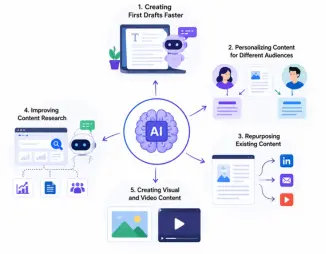
Creating First Drafts Faster
Most teams use AI to get past the blank page. It writes something rough. A human then shapes it into something that actually sounds like the brand.
I have seen this go wrong when teams skip the shaping part completely. The draft goes live as is. It reads fine, but it feels hollow somehow.
Personalizing Content For Different Audiences
Customer segments respond differently to the same message. AI helps generate variations for each persona without starting from scratch every single time.
A SaaS company might use one tone for enterprise buyers and a lighter tone for small business owners, all from the same base content.
Repurposing Existing Content
A single blog post can become LinkedIn posts, a newsletter section, or even a short video script.
This is honestly one of the more practical uses businesses have found, and one where things like useful ChatGPT prompts for companies genuinely save hours of manual rewriting work.
Improving Content Research
AI tools scan trends, competitor content, and common audience questions quickly. It does not replace research. It speeds up the boring part of it.
Creating Visual and Video Content
Tools like Midjourney, DALL-E, and various AI video generators are helping teams create visuals without a full design team on standby.
A Practical Content Workflow For Businesses Using AI
After testing a few different setups with content teams, one structure kept showing up as the one that actually worked, again and again, across different projects.
Step 1: Define Content Goals
Before opening any AI tool, decide what the content actually needs to achieve. Is it SEO content, audience research, or part of a bigger content marketing campaign?
Skipping this step usually leads to generic output nobody asked for in the first place.
- Know your audience’s research and where they sit in the customer journey
- Decide if the goal is brand awareness, education, or direct conversion
- Write the goal down somewhere; do not just think it and move on
Step 2: Build Clear AI Prompts
Vague prompts give vague results every single time, no exceptions really.
Strong prompt engineering includes specific tone, audience details, and format instructions. Large language models respond better to context-rich prompts than short lazy ones.
- Include audience details and desired tone inside every prompt
- Reference existing brand voice examples the model can follow
- Test two or three prompt variations before settling on one
Step 3: Generate A Few Draft Variations
Neural networks and generative models produce slightly different output each run, so one single draft rarely tells the full story.
Comparing a few versions side by side gives editors a stronger starting point for content optimization later.
- Generate at least two or three versions of the same piece
- Compare structure, tone, and depth across each draft
- Pull the strongest sections from different drafts if needed
Step 4: Human Review And Editing
This is the step that protects customer trust and brand consistency. A human editor reworks tone, adds original insight, and checks every fact before anything goes near publish.
Skipping this step is where most businesses get burned, and it usually shows up fast once readers notice content that feels hollow.
- Add real examples and context the AI could not possibly know
- Verify statistics, quotes, and technical claims carefully
- Smooth out sentence rhythm so it stops sounding like a machine
Step 5: Measure Performance
Publishing is not the finish line. Businesses need to track how each piece moves through the customer journey using real engagement data, not just gut feeling.
- Watch organic traffic and keyword ranking changes over time
- Track engagement signals like time on page and shares
- Feed what you learn back into the next editorial workflow cycle
If you are experimenting with prompts, learning a few solid ChatGPT productivity hacks early on can save a lot of trial and error later in this process.
What I Learned From Testing Generative AI Content Workflows
Reading about AI is one thing. Actually running it through real content work is another thing completely.
Here are two small experiments that taught me more than any tool description ever did.
Experiment 1: Writing Complete Blog Drafts With AI
Goal: Reduce writing time on long-form blog posts.
Result: Structure improved a lot. Outlines came together fast. But originality was weak; the insights felt generic, almost like something you had read somewhere before.
Learning: AI works best as an assistant during drafting, not as a full replacement for the writer’s judgment or industry knowledge.
Experiment 2: Using AI for Content Repurposing
Goal: Turn one article into multiple formats, like social posts and newsletter sections.
Result: This one actually saved real time. Repurposing existing content worked smoothly, especially for shorter formats.
Learning: AI performs noticeably better when the original piece already has strong insights, real data, and a clear brand voice baked into it. Garbage in, garbage out still applies here.
These two experiments changed how I think about generative models. They are fast, sometimes surprisingly fast. But they still need a person steering the direction.
How Businesses Maintain Brand Authenticity With AI
This is the part most articles skip, and it happens to be the part that matters most.
AI can generate content. It cannot generate meaning on its own. That still comes from people.
Create Clear Brand Guidelines
Tone, vocabulary, things to avoid- all of it needs to be written down somewhere the AI tool can reference, even if just mentally by the person prompting it.
Train the Process With Brand Voice Examples
Feeding a tool a few strong examples of your existing content improves output quality noticeably. This is not optional if consistency matters to you.
Add Human Review Every Single Time
No exceptions here. Raw AI output going straight to publish is where brand trust quietly erodes over time.
One mistake I have seen repeatedly is teams assuming AI understands their brand after one or two prompts. It does not. It needs direction, again and again.
Real Business Examples of Generative AI Content Creation
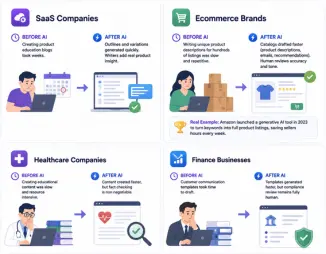
See how SaaS, e-commerce, healthcare, and finance businesses use generative AI to speed up content creation while keeping human review essential.
SaaS Companies
Before AI, creating a full set of product education blogs could take weeks, sometimes longer if the writer had to interview the product team for every detail.
After adopting AI-assisted workflows, teams generate outlines and rough variations quickly, then writers add the product-specific insight a tool simply cannot know on its own.
Ecommerce Brands
Before AI, writing unique product descriptions for hundreds of listings was slow, repetitive work that content teams often pushed to the bottom of the list.
After AI, that same catalog can be drafted much faster, covering product descriptions, email personalization, and recommendation copy, while a human still checks accuracy and tone.
A real example of this shift is Amazon, which rolled out a generative AI tool in 2023 to help sellers turn brief keywords into full product listing content, saving time on a task that used to eat hours every week.
Healthcare Companies
Educational content gets a speed boost, though fact-checking becomes non-negotiable in this space.
Finance Businesses
Customer communication templates are generated faster, but compliance review remains fully human, and it should stay that way.
Common Mistakes Businesses Make When Using Generative AI
Learn the most common generative AI mistakes businesses make and discover practical ways to improve accuracy, brand consistency, and content quality.
Treating AI As A Full Replacement
Many teams start out assuming AI removes the need for human input entirely. It does not. It lacks business context, customer history, and judgment.
Publishing Raw AI Content
Content sounds correct on the surface but often lacks original insight or lived experience. Readers can sense that, even if they cannot explain why.
Skipping Fact Checking
AI can sound confident while being completely wrong. Always verify numbers, claims, and quotes before anything goes live.
Using AI Without a Strategy
Random prompting without a clear content goal usually produces content that technically exists but does not actually help anyone.
Best Practices For Using AI Without Losing Human Creativity
- Combine AI speed with human judgment every time, no shortcuts.
- Review every single output before it gets published anywhere.
- Protect customer data carefully when feeding information into any AI tool.
Track how content performs so you know what is actually working.
If accuracy has been a struggle for your team, looking into a few ChatGPT accuracy improvement tips can genuinely tighten up your review process before content goes out the door.
Traditional Content Creation vs AI-Assisted Content Creation
Seeing the two approaches side by side makes the shift easier to picture.
| Area | Traditional | AI Assisted |
| Research | Manual | AI supported |
| Drafting | Human only | AI plus human |
| Personalization | Slow | Faster |
| Scaling | Difficult | Easier |
| Quality control | Human | Human led |
Notice that quality control stays human-led either way. That part never really changes, no matter how advanced the AI models get.
The Future of Generative AI in Business Content Creation
AI agents that handle entire workflows on their own are coming, slowly but surely.
Hyper-personalisation will likely get sharper, adjusting content per individual reader rather than broad segments.
Enterprise AI systems will probably integrate deeper into existing marketing platforms like HubSpot, Salesforce, and Adobe Experience Cloud.
None of this replaces human strategy, though. It just changes how much manual work sits underneath it.
Final Thoughts
Generative AI for content creation is not about replacing the people who build a brand’s voice.
It is a tool that speeds up the boring parts so humans can focus on the parts that actually need judgment, taste, and experience.
Businesses that treat it as a partner, not a shortcut, tend to keep their content sounding like them.
The ones that skip the human step usually notice it later, when engagement quietly starts to drop.
AI can increase output. But the real advantage still comes from pairing that speed with human strategy, every single time.
FAQs
How do businesses use generative AI for content creation?
They use it to draft content faster, personalize messaging, repurpose existing material, and speed up research, while humans handle editing and brand voice.
Can AI create authentic brand content on its own?
Not really. It can produce a starting draft, but authenticity usually comes from human review, real examples, and brand-specific context added afterwards.
Is AI replacing content creators?
Not in most cases observed so far. It changes the workflow, shifting writers toward editing, strategy, and quality control rather than replacing them outright.
What are the benefits of using AI for content?
Faster production, lower costs, easier personalization, and quicker content repurposing across different channels are the most commonly reported benefits.
How can companies improve AI-generated content quality?
Clear prompts, strong brand guidelines, consistent human editing, and regular fact checking all improve output quality noticeably over time.

He is an AI & Technology Content Specialist covering generative AI, ChatGPT, AI tools, automation, and emerging technologies. His work focuses on researching complex AI developments and turning them into practical, easy-to-understand insights.